
Jump to content

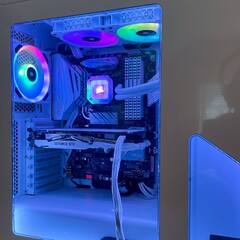
Just installed a Corsair H150i Elite Capellix AIO in my system, along with one other Corsair fan (LL 120 RGB). When using iCue to control the fan speeds, when I click on the "Cooling Presets" it does nothing. I have to go to each individual fan and change the cooling level (quiet, balanced, extreme etc...). Do the presets not auto adjust the fans or am I missing something? 


On a side note, this is my first non air cooling system and I really like it! Dropped my temps by about 10-12 degrees on my overclocked i7 6700K (when fans are set to extreme). 


iCue.PNG

Link to comment
https://linustechtips.com/topic/1443895-icue-not-working/
Share on other sites

Link to post
Share on other sites

2 minutes ago, Digideath said:

Just a broken preset. Don't worry about it. You know you can set them manually so what's the problem? Fyi i always set manually. Never trust presets.

Does it do an auto-tune for each setting? I am used to using Asus Fan Xpert, I click a button and it does the rest. Is this possible in iCue? I am not familiar with manually tuning fans...

Link to comment
https://linustechtips.com/topic/1443895-icue-not-working/#findComment-15484951
Share on other sites

Link to post
Share on other sites

1 minute ago, w8kdrifter said:

Does it do an auto-tune for each setting? I am used to using Asus Fan Xpert, I click a button and it does the rest. Is this possible in iCue? I am not familiar with manually tuning fans...

See that pic you posted? Next to each fan there is a grey box saying "extreme" with a little down arrow? Just click on it and select the setting you want to use. It's that simple to do it manually. If it's locked out/not responding to mouse clicks then go into the settings and find out what option is locking it out and switch it off. But you should really learn how to manually set fan curves and such. Use google. Put the effort in. Study up. I personally wouldn't use that software. I prefer to be in control. I have my own ways of controlling fans.

Link to comment
https://linustechtips.com/topic/1443895-icue-not-working/#findComment-15484957
Share on other sites

Link to post
Share on other sites

6 minutes ago, Digideath said:

See that pic you posted? Next to each fan there is a grey box saying "extreme" with a little down arrow? Just click on it and select the setting you want to use. It's that simple to do it manually. 

Yes, thank you. I am familiar with that. Just trying to not have to manually adjust each fan every time. hence the whole reason for my post 😉  

Link to comment
https://linustechtips.com/topic/1443895-icue-not-working/#findComment-15484966
Share on other sites

Link to post
Share on other sites

6 minutes ago, w8kdrifter said:

Yes, thank you. I am familiar with that. Just trying to not have to manually adjust each fan every time. hence the whole reason for my post 😉  


You don't have to adjust it every time. Look i use a program to control my fans called speed fan. It's been about almost as long as windows. It works very well. Manually set a curve so the fans ramp up and down depending on temps. It's not rocket science. It's actually more effective and less noisy. You only have to set it once and that's it. Your good to go.

Link to comment
https://linustechtips.com/topic/1443895-icue-not-working/#findComment-15484972
Share on other sites

Link to post
Share on other sites

Create an account or sign in to comment

You need to be a member in order to leave a comment

Create an account

Sign up for a new account in our community. It's easy!

Register a new account

Sign in

Already have an account? Sign in here.

Sign In Now

×


