Jump to content

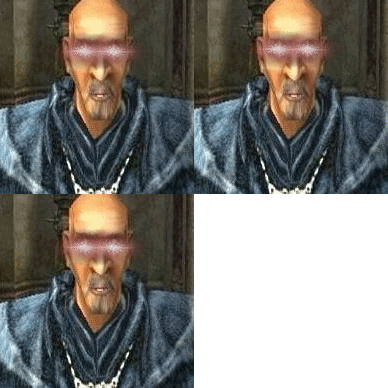
Here a Pic of what i mean i have this issue with lightsources in multiple games (injustice2, kingdom come deliverance ...)

does anyone know why ? i am on win11 with a 3080 on a 4k 60hz benq vsync forced off with fps capped to 57 with rtss. if its a monitor issue can a screenshot even capture this ? software issue ? gsync/freesync issue ? hdr issue w11 ? plz any help would be great i am at an loss here.Unbenannt.thumb.png.104f466270e74fd7635b0289c67880f5.png

Link to comment
https://linustechtips.com/topic/1406630-weird-lightshadow-issue-with-multiple-games/
Share on other sites

Link to post
Share on other sites

13 minutes ago, John Reactor said:

I think it is your monitor. Propably some setting conected to local dimming function or something or maybe you not running game in your monitor`s native resolution.

but if i take a screenshot and it still visible in it how can the monitor be at fault ? screenshots should be taken from the gpus output not from the monitor. also resoultuon is 4k native on 4k monitor

Link to post
Share on other sites

17 minutes ago, John Reactor said:

Oh. Ok. Got me fouled there. I thought it was picture from mobile phone.

Anyway.

Try runing the game at 1920x1080. does problem persists?

tested it with fullhd and wqhd i only get this at 4k for some strange reason ... but my monitor is a native 4k monitor a benq el2870u -  heres rest of my system 10850k 3080 zotac 64gb 3200mhz sn550 2tb nvme (the games are on this drive mostly) a coule of hdds and fans all on a z490 board asus rog strix z490g gaming wifi

Link to post
Share on other sites

I would say it`s texture scaling issue. couple possible reasons.
1. game`s  textures are prepared only for 1080p game-play and scaled up to 4k starting show up scaling artefacts.
2. Game engine isn`t optimised to run in 4k and it`s internal upscaler cant prepare textures correctly.
3. GPU Driver upscaling bug. But this is least possible.
To summarize: I would not be worried about it.

Link to post
Share on other sites

12 hours ago, John Reactor said:

I would say it`s texture scaling issue. couple possible reasons.
1. game`s  textures are prepared only for 1080p game-play and scaled up to 4k starting show up scaling artefacts.
2. Game engine isn`t optimised to run in 4k and it`s internal upscaler cant prepare textures correctly.
3. GPU Driver upscaling bug. But this is least possible.
To summarize: I would not be worried about it.

maybe but its still some abnormal and if anyone actually knows why and what it is even if they dont know a way to fix it, that at least would be great 

Link to post
Share on other sites

Create an account or sign in to comment

You need to be a member in order to leave a comment

Create an account

Sign up for a new account in our community. It's easy!

Register a new account

Sign in

Already have an account? Sign in here.

Sign In Now

×