
Jump to content

Subnets on a layer 2/unmanaged switch

Go to solution Solved by LAwLz,

You can't do this with a layer 2 switch alone. It sounds like you want a "router on a stick" config.

Here is a visual representation:
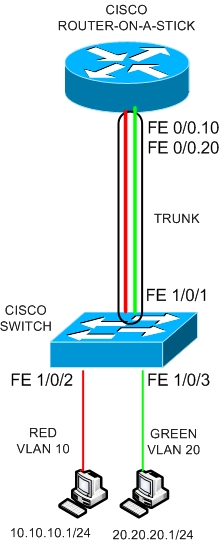
 

router-on-a-stick.jpg


Here is how to set it up and how it will function:

Create several sub interfaces on your router. In the picture the sub interfaces are Fe0/0.10 and Fe0/0.20. Both of these are virtual interfaces connected to Fe0/0.

Both of these sub interfaces will have its own unique IP and will pretty much act like a normal interface would do. You need one sub interface for each VLAN. On the switch you set the port connected to the virtual interfaces in trucking mode for the VLANs.

The other ports will be in access mode, and will only allow 1 VLAN each. in the picture above, the computer with the red wire and the computer with the green wire can not talk to each other directly through the switch. The packet will first have to go up to the router, get retagged with a different VLAN and then go down to the switch again. You can set special permissions to applying access lists on the sub interfaces if you want. For example you might want the red wired computer to be able to send files to the green one, but not vice versa.


All VLANs need their own subnet as well as their own subinterface on the router. Each subinterface needs an unique IP as well, and that is the IP you set as the default gateway.

So if you make 192.168.10.0 to a subnet, and include that in VLAN 10, then I suggest you make the sub interface Fe0/0.10 and set the IP (which will be the default gateway address) to 192.168.10.1.


I can make a packet tracer config file if you're interested. Then you could see the exact config (at least on Cisco equipment).

Hope this helped.

Hi,


I've been doing a lot of work involving networks recently at uni and I have a fairly long winded question.


Say I want to separate up a bunch of hosts into different subnets, sometimes with in the same group (like 192.168.0.0/27, .0 - .31, .32 - .64 etc) and sometimes I want to put them in different class networks all together.


Now my learning brain would say it is best to separate these subnets up physically as well, but I wanted to know what was actually possible. Could I have all these machines on a single switch and have multiples classes and multiple subnets? How would the default gateway work in that situation? (Because there is only one and not a few) Also would these subnets be able to communicate because they are on the same switch?


I currently have a network drawn up in my head where there is a router with switches and each switch represents another subnet, whether its a different class or not. Is that a good solution?


I know of VLANs a little bit but I'm not sure how you might apply them in this situation either.


Thanks and sorry if I'm not being clear.


Link to comment
https://linustechtips.com/topic/139001-subnets-on-a-layer-2unmanaged-switch/
Share on other sites

Link to post
Share on other sites

Well you can''t have them on a layer 2 switch, no. A switch is basically transparent to the network and having hosts there on different subnets wouldn't go very well at all. You need to seperate them at a layer 3 lever, usually a router. What is usually the case is you have one router to which all of your subnets are connected (for a simple network, you can of course have multiple routers and switches etc) and you assign each port on that router an IP within the relevant subnet's range. So you'd have the interface gig0/0 192.168.0.1 and interface gig0/1 192.168.0.33 etc. So each subnet has it's own default gateway but they all lead to the same router.


So you have all your hosts from ONE subnet connect to a switch which connects to a router. So if you have 3 subnets you have 3 switches and 1 router.

Case: Meatbag, humanoid - APU: Human Brain version 1.53 (stock clock) - Storage: 100TB SND (Squishy Neuron Drive) - PSU: a combined 500W of Mitochondrial cells - Optical Drives: 2 Oculi, with corrective lenses.

Link to post
Share on other sites

Yeah that's what I expected, in what situation would you be able to create multiple subnets on a switch, would it need to be 'smart' or managed so that it overlaps into layer 3?


Also how would it be possible to split a subnet across multiple interfaces, so say I have 2 switches connected to separate ports but I want all the machines on the same subnet, can you just set say 192.168.0.1 and 192.168.0.2 as default gateways (You can't set the same one right?) and as long as everything is on the same subnet then it would all be able to communicate in the same way?

Link to post
Share on other sites

Yeah that's what I expected, in what situation would you be able to create multiple subnets on a switch, would it need to be 'smart' or managed so that it overlaps into layer 3?


Also how would it be possible to split a subnet across multiple interfaces, so say I have 2 switches connected to separate ports but I want all the machines on the same subnet, can you just set say 192.168.0.1 and 192.168.0.2 as default gateways (You can't set the same one right?) and as long as everything is on the same subnet then it would all be able to communicate in the same way?

There is such a thing as a layer 3 switch, which cannot do routing per se but does do switching based on IP adressing and allows you to assign adresses to interfaces. So I think you can use that to seperate your Vlans. To activate this function in a compatible cisco switch you should follow this procedure here http://www.cisco.com/c/en/us/support/docs/lan-switching/inter-vlan-routing/41860-howto-L3-intervlanrouting.html


That said usually people just use a router since it's a lot less hassle, but you can do it if none are available.


As for splitting up the subnets, that's not a great idea. Each interface on a router should lead to a different LAN and having them use the same IP range is going to mess up pretty badly. Best practice is to either connect them to a communal switch first or to assign them different subnets.

Case: Meatbag, humanoid - APU: Human Brain version 1.53 (stock clock) - Storage: 100TB SND (Squishy Neuron Drive) - PSU: a combined 500W of Mitochondrial cells - Optical Drives: 2 Oculi, with corrective lenses.

Link to post
Share on other sites

On a router you could set up virtual interfaces for each of those subnets and tag them on different VLANs. Across your switching network, you will be able to split these off at a per port basis (and untag the traffic going to the computer, tag the traffic coming from).

Link to post
Share on other sites

You can't do this with a layer 2 switch alone. It sounds like you want a "router on a stick" config.

Here is a visual representation:


router-on-a-stick.jpg


Here is how to set it up and how it will function:

Create several sub interfaces on your router. In the picture the sub interfaces are Fe0/0.10 and Fe0/0.20. Both of these are virtual interfaces connected to Fe0/0.

Both of these sub interfaces will have its own unique IP and will pretty much act like a normal interface would do. You need one sub interface for each VLAN. On the switch you set the port connected to the virtual interfaces in trucking mode for the VLANs.

The other ports will be in access mode, and will only allow 1 VLAN each. in the picture above, the computer with the red wire and the computer with the green wire can not talk to each other directly through the switch. The packet will first have to go up to the router, get retagged with a different VLAN and then go down to the switch again. You can set special permissions to applying access lists on the sub interfaces if you want. For example you might want the red wired computer to be able to send files to the green one, but not vice versa.


All VLANs need their own subnet as well as their own subinterface on the router. Each subinterface needs an unique IP as well, and that is the IP you set as the default gateway.

So if you make 192.168.10.0 to a subnet, and include that in VLAN 10, then I suggest you make the sub interface Fe0/0.10 and set the IP (which will be the default gateway address) to 192.168.10.1.


I can make a packet tracer config file if you're interested. Then you could see the exact config (at least on Cisco equipment).

Hope this helped.

Link to post
Share on other sites

Yes! Thank you very much for your help guys, and thank you for the offer of the PT file but it's okay I found a fair bit of extra info on it, I read about sub interfaces but It didn't click until I saw that picture so yeah great work.  :D


My brain is satisfied.

Link to post
Share on other sites

Create an account or sign in to comment

You need to be a member in order to leave a comment

Create an account

Sign up for a new account in our community. It's easy!

Register a new account

Sign in

Already have an account? Sign in here.

Sign In Now

×

