Jump to content

SSD Compatibility

Go to solution Solved by Guest,
25 minutes ago, Azriel said:

Well I just tried enabling the M.2 slot and it’s still not working

Ok so reading further into the ASUS manual reveals that the m.2 slot on your board is a PCI-E slot. A m.2 SATA ssd like the 860 evo won't work in a m.2 pci-e slot, only in a m.2 SATA slot.


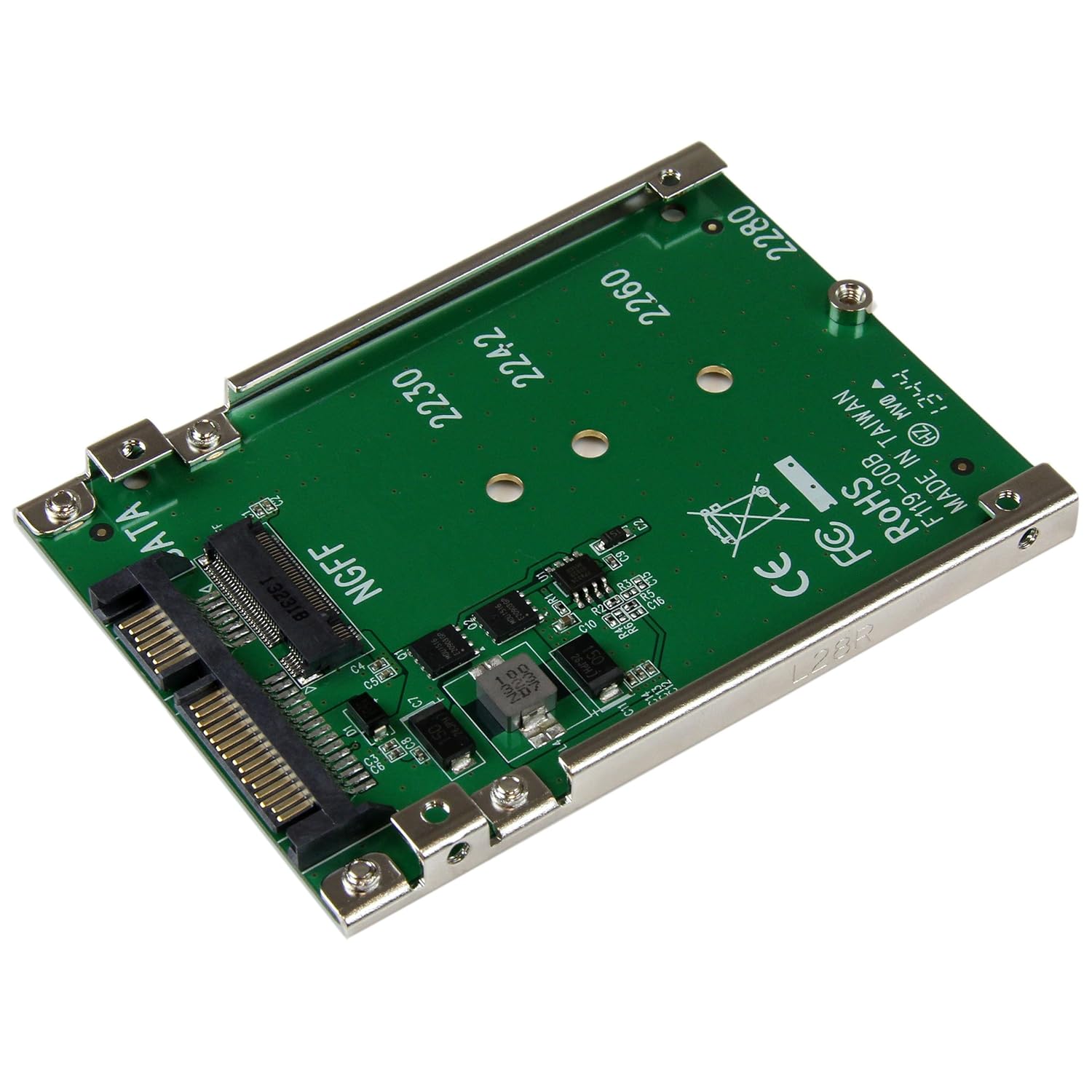
What you need is a M.2 to 2.5" SATA adapter that allows you to plug in your drive via a normal SATA cable like traditional drives. They look like this.

I have this 860 and need it to work in this mobo? What adapter can be purchased to access my files and use it since my OS is on the SSD. If one could be found on Walmart’s site, it would be great, but Amazon is fine as well.


Please look what PCpartpicker says: https://pcpartpicker.com/list/GGmmZR


Edited by Azriel
Link to comment
https://linustechtips.com/topic/1028052-ssd-compatibility/
Share on other sites

Link to post
Share on other sites

3 minutes ago, Azriel said:

The SSD doesn’t pop up in bootable drives in the bios. If you know how to fix that, I would be so thankful.

Did you tried updating the BIOS?

"Once there was an explosion, a bang that gave birth to time and space. Once there was an explosion, a bang that set a planet spinning in that space. Once there was an explosion, a bang that gave rise to life as we know it... And then came the next explosion. An explosion that will be our last"


"... To see the world in a grain of sand. Heaven in a wild flower

Hold infinite in the palm of your hand.  And eternity in an hour ..."


PC: 1

CPU: AMD Ryzen 9 3900X 4.3GHz 1.3875v Motherboard: AsRock X470 Taichi (BIOS: Agesa 1.0.0.3 ABB) RAM: 4x8GB(32) 3200MHzCL16 Hyper X GPU: GTX 980 Ti Waterforce Xtreme Core Clock: 1595MHz Memory Clock: 8000MHz Storage: SAMSUNG EVO 860 2TB(OS) / SAMSUNG EVO 860 1TB(Backup) Cooler: NZXT Hydro X72 360mm Case: NZXT Phantom 820 PSU: Corsair TX-750w Display Monitor: Monitor AOC AG251FG 240Hz G-Sync 1080p Headset: Headset LogiTech G633 OS: Windows 10 Pro 64-bit (Version: 1909 / OS Build: )

NOTEBOOK:

Model: Acer Aspire 5516 CPU: AMD TF-20 1.6GHz(1C/1T) GPU: ATI Radeon X1200(256MB) RAM: 4GB(2x2GB) 666MHz HD: SSD Sandisk PLUS 240GB OS: Windows 7 Ultimate SP1 x64

Link to comment
https://linustechtips.com/topic/1028052-ssd-compatibility/#findComment-12250713
Share on other sites

Link to post
Share on other sites

Just now, Azriel said:

No but I’m not too sure that that would be helpful. All bios updates mention system stability and one mentions 5th gen CPUs. The newest BIOS update that is a beta.

1. You could check BIOS option in boot/drive setup (whatever it is) and check if there is anything about enabling pci-e storage etc.

2. Update your BIOS and try again.

Link to comment
https://linustechtips.com/topic/1028052-ssd-compatibility/#findComment-12250761
Share on other sites

Link to post
Share on other sites

14 minutes ago, Medicate said:

According to ASUS the M.2 slot is disabled by default. You need to enable it in the BIOS.

Well I just tried enabling the M.2 slot and it’s still not working should I have waited to install the SSD after it was enabled?

Link to comment
https://linustechtips.com/topic/1028052-ssd-compatibility/#findComment-12250789
Share on other sites

Link to post
Share on other sites

10 minutes ago, Mholes said:

1. You could check BIOS option in boot/drive setup (whatever it is) and check if there is anything about enabling pci-e storage etc.

2. Update your BIOS and try again.

What does your first option mean in terms of pci-e? My SSD is M.2 form factor.

Link to comment
https://linustechtips.com/topic/1028052-ssd-compatibility/#findComment-12250793
Share on other sites

Link to post
Share on other sites

25 minutes ago, Azriel said:

Well I just tried enabling the M.2 slot and it’s still not working

Ok so reading further into the ASUS manual reveals that the m.2 slot on your board is a PCI-E slot. A m.2 SATA ssd like the 860 evo won't work in a m.2 pci-e slot, only in a m.2 SATA slot.


What you need is a M.2 to 2.5" SATA adapter that allows you to plug in your drive via a normal SATA cable like traditional drives. They look like this.

Link to comment
https://linustechtips.com/topic/1028052-ssd-compatibility/#findComment-12250813
Share on other sites

Link to post
Share on other sites

12 minutes ago, Medicate said:

Ok so reading further into the ASUS manual reveals that the m.2 slot on your board is a PCI-E slot. A m.2 SATA ssd like the 860 evo won't work in a m.2 pci-e slot, only in a PCI-e SATA slot.


What you need is a M.2 to 2.5" SATA adapter that allows you to plug in your drive via a normal SATA cable like traditional drives. They look like this.

Thanks!

Link to comment
https://linustechtips.com/topic/1028052-ssd-compatibility/#findComment-12250839
Share on other sites

Link to post
Share on other sites

5 hours ago, Medicate said:

Ok so reading further into the ASUS manual reveals that the m.2 slot on your board is a PCI-E slot. A m.2 SATA ssd like the 860 evo won't work in a m.2 pci-e slot, only in a m.2 SATA slot.


What you need is a M.2 to 2.5" SATA adapter that allows you to plug in your drive via a normal SATA cable like traditional drives. They look like this.

Quick question, would this work https://www.officedepot.com/a/products/151649/StarTechcom-x4-PCI-Express-to-M2/ ? 

Link to comment
https://linustechtips.com/topic/1028052-ssd-compatibility/#findComment-12251882
Share on other sites

Link to post
Share on other sites

Create an account or sign in to comment

You need to be a member in order to leave a comment

Create an account

Sign up for a new account in our community. It's easy!

Register a new account

Sign in

Already have an account? Sign in here.

Sign In Now

×