
Jump to content

HDD not recognised

Go to solution Solved by Treedubz,


Hi i need some help please


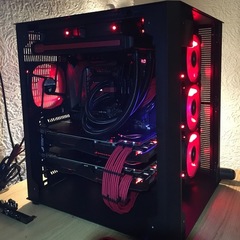
Ive just build a brand new living room PC for light gaming and media


Ive got a 240gb samsung m.2 and a 1TB WD red drive


Ive installed windows amd booted from the m.2 drive but the 1TB WD red drive is not showing in windows?


It was in the bios in various areas so im not sure why it isnt showing in windows?


Any pointers be appreciated thanks


Asus Z170i gaming mobo

Samsung m.2 950 240gb

WD 1TB Red HDD

Asus Strix 1070 RGB

16GB RipJaw DDR4

Corsair H100i CPU cooler

Windows 10 64bit Home

Link to comment
https://linustechtips.com/topic/646967-hdd-not-recognised/
Share on other sites

Link to post
Share on other sites


GPU: ASUS Strix GTX 1070,  CPU: i5-6600k OC to 4.0 GHz,  PSU: Rosewill Capstone G750 750W,  Mobo: MSI Z170A Krait Gaming,  Case: NZXT H440 White,  Memory: G.Skill Ripjaws V 16GB (2x8),  HDD: Seagate Barracuda 2TB, Mouse: Razer Ouroboros,  Keyboard: Razer BlackWidow Chroma, Mousepad: Razer Overwatch KB+M pad, Headset: Corsair Void RGB,  Monitor: 1x ASUS PB277Q 27" 1440p & 1x HP Pavilion 25cw 25-inch 1080p


Link to comment
https://linustechtips.com/topic/646967-hdd-not-recognised/#findComment-8325094
Share on other sites

Link to post
Share on other sites

Did you just say that that system was for light gaming?


what games do you run


http://pcpartpicker.com/list/Mf3Zcc My build


R.I.P Donny- Got banned. We will always remember your spamming of "Cancerbooks"


iPhones are like 1 ply toliet paper with a logo slapped on them and years old hardware in them- A Wise Man

Link to comment
https://linustechtips.com/topic/646967-hdd-not-recognised/#findComment-8325107
Share on other sites

Link to post
Share on other sites

5 hours ago, Sean- said:

~snip~

Hey there Sean- :)


What settings did you end up doing on your WD Red (Basic or Dynamic, file system, partitions, etc.)? 

Have in mind that if you are using a Dynamic disk you won't be able to use that drive on another computer and may even have problems running it on another SATA port. Here's some more info on this


Also, is there a particular reason why you went for the NAS/RAID WD Red drive? 


Captain_WD.

If this helped you, like and choose it as best answer - you might help someone else with the same issue. ^_^
WDC Representative, http://www.wdc.com/ 

Link to comment
https://linustechtips.com/topic/646967-hdd-not-recognised/#findComment-8326336
Share on other sites

Link to post
Share on other sites

17 hours ago, Captain_WD said:

Hey there Sean- :)


What settings did you end up doing on your WD Red (Basic or Dynamic, file system, partitions, etc.)? 

Have in mind that if you are using a Dynamic disk you won't be able to use that drive on another computer and may even have problems running it on another SATA port. Here's some more info on this


Also, is there a particular reason why you went for the NAS/RAID WD Red drive? 


Captain_WD.

Hi, i didnt select either, i followed the the Linus video instructions which was a different selection.


I went with the red based on YouTuber reviews, its a HTPC firstly, and for living room gaming secondly, so it will be on 24/7. WD RED seemed to be the reviewers favorite for 24/7 operation!


Edit: That link is broken :D

Link to comment
https://linustechtips.com/topic/646967-hdd-not-recognised/#findComment-8329967
Share on other sites

Link to post
Share on other sites

7 hours ago, Sean- said:

~snip~

WD Red drives are designed for NAS and RAID usage but it should work just fine for you. :)


If you have followed the video you should have ended up with the simplest and most popular way of setting up the drive (Basic Drive, Simple volume, NTFS file system, default Allocation Unit Size. :)


This link should work: https://msdn.microsoft.com/en-us/library/windows/desktop/aa363785(v=vs.85).aspx

This too: http://support.wdc.com/KnowledgeBase/answer.aspx?ID=282  


Let me know if you need help :)


Captain_WD. 

If this helped you, like and choose it as best answer - you might help someone else with the same issue. ^_^
WDC Representative, http://www.wdc.com/ 

Link to comment
https://linustechtips.com/topic/646967-hdd-not-recognised/#findComment-8331623
Share on other sites

Link to post
Share on other sites

Create an account or sign in to comment

You need to be a member in order to leave a comment

Create an account

Sign up for a new account in our community. It's easy!

Register a new account

Sign in

Already have an account? Sign in here.

Sign In Now

×




