Jump to content

Audio Problems "No sound"
Go to solution Solved by EmoRarity,

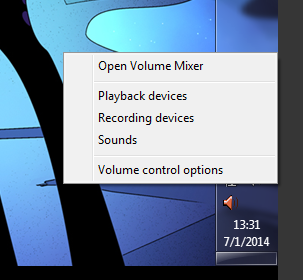
Right click on the speaker icon
4d98a28c5675878f34f5dd8fd8710dfa.png
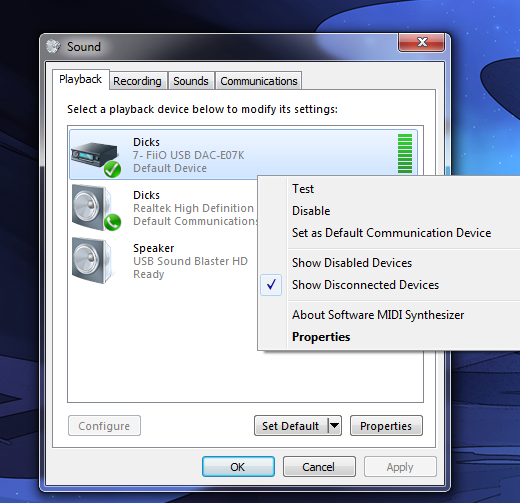
And go to playback devices
6bf95382f09ff6a60012c3986619dd93.png
Then set your hdmi output as the default device. 

Today I turned my computer on and have an x on my speaker icon when I put my curser on it, it says "No Audio Output devise is installed". This computer build is no more than a week old and this is the first time I have had this problem. The only thing new I have done was add a new keyboard and mouse that I got today. The sound is enabled in the bios and it says it starts on bootup in msconfig. Can anyone help?

AMD FX 6300 Black Edition, ASRock 990FX Killer, 16GBs Memory @2133, 2 MSI R9 270x's in Crossfire, NZXT Kraken X41 Cooler, Samsung 850 pro SSD, 1 TB HDD, EVGA Supernova NEX 650 G, and with 4 other fans.

Link to comment
https://linustechtips.com/topic/173991-audio-problems-no-sound/
Share on other sites

Link to post
Share on other sites

Today I turned my computer on and have an x on my speaker icon when I put my curser on it, it says "No Audio Output devise is installed". This computer build is no more than a week old and this is the first time I have had this problem. The only thing new I have done was add a new keyboard and mouse that I got today. The sound is enabled in the bios and it says it starts on bootup in msconfig. Can anyone help?

Are you plugging your speakers into IO shield or the one on your case? If its on your case it might be a loose connector?

My system: CPU: i5-4670k CPU-Cooler: be quiet Dark Rock Pro 3 Mobo: Gigabyte GA-Z87X-UD4H Ram: 8GB Kingston HyperX fury (red) SSD: Samasing 840 EVO 120GB HDD: Seagate Barracuda 2TB GPU: Gigabyte GeForce GTX 780 3GB Windforce Case: Fractal Define R4 windowed PSU: Corsair CX 600W Semi-Modular OS: Windows 7 Home Premium.

Laptop: Dell Laptop - Some crap i5 and 8GB of DDR3 ram. OS: Duel Boot - Windows 8 & Ubuntu! 

Link to comment
https://linustechtips.com/topic/173991-audio-problems-no-sound/#findComment-2310667
Share on other sites

Link to post
Share on other sites

I just have a HDMI cable running from the computer to a LCD TV. Just been using the TV speakers for now until I can get some speakers.

AMD FX 6300 Black Edition, ASRock 990FX Killer, 16GBs Memory @2133, 2 MSI R9 270x's in Crossfire, NZXT Kraken X41 Cooler, Samsung 850 pro SSD, 1 TB HDD, EVGA Supernova NEX 650 G, and with 4 other fans.

Link to comment
https://linustechtips.com/topic/173991-audio-problems-no-sound/#findComment-2310736
Share on other sites

Link to post
Share on other sites

The TV does have sound, just not with the computer.

AMD FX 6300 Black Edition, ASRock 990FX Killer, 16GBs Memory @2133, 2 MSI R9 270x's in Crossfire, NZXT Kraken X41 Cooler, Samsung 850 pro SSD, 1 TB HDD, EVGA Supernova NEX 650 G, and with 4 other fans.

Link to comment
https://linustechtips.com/topic/173991-audio-problems-no-sound/#findComment-2310746
Share on other sites

Link to post
Share on other sites

The TV does have sound just not with the computer and I have a HDMI cable running from the computer to the TV. This is the first time I have not had sound.

AMD FX 6300 Black Edition, ASRock 990FX Killer, 16GBs Memory @2133, 2 MSI R9 270x's in Crossfire, NZXT Kraken X41 Cooler, Samsung 850 pro SSD, 1 TB HDD, EVGA Supernova NEX 650 G, and with 4 other fans.

Link to comment
https://linustechtips.com/topic/173991-audio-problems-no-sound/#findComment-2310750
Share on other sites

Link to post
Share on other sites

The TV does have sound just not with the computer and I have a HDMI cable running from the computer to the TV. This is the first time I have not had sound.

Sound through hdmi is handled by your graphics card driver. Update/reinstall those.

Link to comment
https://linustechtips.com/topic/173991-audio-problems-no-sound/#findComment-2315698
Share on other sites

Link to post
Share on other sites

I don't have a graphics card (yet), I Have a AMD APU A10 7850k kavari. I just tried updating all the drivers for the APU and I still have no sound.   

AMD FX 6300 Black Edition, ASRock 990FX Killer, 16GBs Memory @2133, 2 MSI R9 270x's in Crossfire, NZXT Kraken X41 Cooler, Samsung 850 pro SSD, 1 TB HDD, EVGA Supernova NEX 650 G, and with 4 other fans.

Link to comment
https://linustechtips.com/topic/173991-audio-problems-no-sound/#findComment-2316575
Share on other sites

Link to post
Share on other sites

Thanks, that was not the problem but I do have everything fixed now and my TV is now set as my default. Thanks for the help.

AMD FX 6300 Black Edition, ASRock 990FX Killer, 16GBs Memory @2133, 2 MSI R9 270x's in Crossfire, NZXT Kraken X41 Cooler, Samsung 850 pro SSD, 1 TB HDD, EVGA Supernova NEX 650 G, and with 4 other fans.

Link to comment
https://linustechtips.com/topic/173991-audio-problems-no-sound/#findComment-2317535
Share on other sites

Link to post
Share on other sites

Thanks everybody I now have everything fixed. I just popped the disc that came with my motherboard in and redid the drivers and programs. fixed it right up.

AMD FX 6300 Black Edition, ASRock 990FX Killer, 16GBs Memory @2133, 2 MSI R9 270x's in Crossfire, NZXT Kraken X41 Cooler, Samsung 850 pro SSD, 1 TB HDD, EVGA Supernova NEX 650 G, and with 4 other fans.

Link to comment
https://linustechtips.com/topic/173991-audio-problems-no-sound/#findComment-2317554
Share on other sites

Link to post
Share on other sites

Create an account or sign in to comment

You need to be a member in order to leave a comment

Create an account

Sign up for a new account in our community. It's easy!

Register a new account

Sign in

Already have an account? Sign in here.

Sign In Now

×