
Jump to content

Can't get full refresh rate

Go to solution Solved by Fasauceome,

It appears the monitor needs the full dual link cable to get 144Hz

Image result for dual link dvi

I used one of these and got a rather descriptive error:
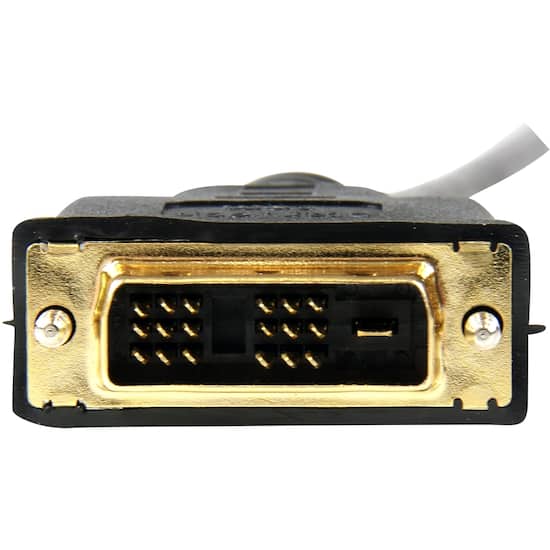
Image result for DVI-D


My Acer GN246HL is only refreshing at 60Hz, and I think it's related to some software on the monitor called "Nvidia 3D" related to some proprietary hardware that's obsolete. Customer service was of no use, and the Acer website did not yield much either. Anyone know a way to unlock the 144 Hz refresh rate on this monitor?

I WILL find your ITX build thread, and I WILL recommend the SIlverstone Sugo SG13B


Primary PC:

i7 8086k - EVGA Z370 Classified K - G.Skill Trident Z RGB - WD SN750 - Jedi Order Titan Xp - Hyper 212 Black (with RGB Riing flair) - EVGA G3 650W - dual booting Windows 11 and Fedora Linux - Black and green theme, Razer brainwashed me.

Draws 400 watts under max load, for reference.


PSU tier list

How many watts do I need?

PSU misconceptions, protections explainedgroup reg is bad

Link to comment
https://linustechtips.com/topic/978641-cant-get-full-refresh-rate/
Share on other sites

Link to post
Share on other sites

Plug it into the appropriate port on the card with the appropriate cable and set it to that hz. 

Main RIg Lian Li O11 MINI, I7 9900k, ASUS ROG Maximus XI Hero, G.Skill Ripjaws 3600 32GB, 3090FE, EVGA 1000G5, Acer Nitro XZ3 2560 x 1440@240hz 


Spare RIg Lian Li O11 AIR MINI, I7 4790K, Asus Maximus VI Extreme, G.Skill Ares 2400 32Gb, EVGA 1080ti, 1080sc 1070sc & 1060 SSC, EVGA 850GA, Acer KG251Q 1920x1080@240hz 


Link to post
Share on other sites

In addition to the above, if you do have it in 3D mode, I'd turn that off.

Solve your own audio issues  |  First Steps with RPi 3  |  Humidity & Condensation  |  Sleep & Hibernation  |  Overclocking RAM  |  Making Backups  |  Displays  |  4K / 8K / 16K / etc.  |  Do I need 80+ Platinum?

If you can read this you're using the wrong theme.  You can change it at the bottom.

Link to post
Share on other sites

Just now, Ryan_Vickers said:

In addition to the above, if you do have it in 3D mode, I'd turn that off.

Unfortunately 3D mode is very confusing and not easy to turn off, I have not figured that one out yet.

2 minutes ago, Mick Naughty said:

Plug it into the appropriate port on the card with the appropriate cable and set it to that hz. 

I have been using an HDMI "with Ethernet" cable that should be able to support 1080p144Hz, but perhaps I should try dual link DVI

I WILL find your ITX build thread, and I WILL recommend the SIlverstone Sugo SG13B


Primary PC:

i7 8086k - EVGA Z370 Classified K - G.Skill Trident Z RGB - WD SN750 - Jedi Order Titan Xp - Hyper 212 Black (with RGB Riing flair) - EVGA G3 650W - dual booting Windows 11 and Fedora Linux - Black and green theme, Razer brainwashed me.

Draws 400 watts under max load, for reference.


PSU tier list

How many watts do I need?

PSU misconceptions, protections explainedgroup reg is bad

Link to post
Share on other sites

Does the card support it? Not giving many details, so it hard to keep guessing. 

Main RIg Lian Li O11 MINI, I7 9900k, ASUS ROG Maximus XI Hero, G.Skill Ripjaws 3600 32GB, 3090FE, EVGA 1000G5, Acer Nitro XZ3 2560 x 1440@240hz 


Spare RIg Lian Li O11 AIR MINI, I7 4790K, Asus Maximus VI Extreme, G.Skill Ares 2400 32Gb, EVGA 1080ti, 1080sc 1070sc & 1060 SSC, EVGA 850GA, Acer KG251Q 1920x1080@240hz 


Link to post
Share on other sites

5 minutes ago, fasauceome said:

Unfortunately 3D mode is very confusing and not easy to turn off, I have not figured that one out yet.

I don't have an nvidia card anymore so I can't confirm but there should be a 3D section in the nvidia control panel, and it shouldn't be complicated.  They may have a fancy brand name for it though, so watch out for that.

Quote

I have been using an HDMI "with Ethernet" cable that should be able to support 1080p144Hz, but perhaps I should try dual link DVI

Even if the cable should handle it fine, it's possible that the monitor cannot.  It's possible that its version of HDMI was so old it does not have the bandwidth, or worse yet, it should have been able to handle it fine but the manufacturer chose not to make the port capable of the full speed dictated in the spec.

Solve your own audio issues  |  First Steps with RPi 3  |  Humidity & Condensation  |  Sleep & Hibernation  |  Overclocking RAM  |  Making Backups  |  Displays  |  4K / 8K / 16K / etc.  |  Do I need 80+ Platinum?

If you can read this you're using the wrong theme.  You can change it at the bottom.

Link to post
Share on other sites

Just now, Mick Naughty said:

Does the card support it? Not giving many details, so it hard to keep guessing. 

RX 580 8GB, hard to imagine no support. Ryzen 5 CPU, 16GB ram, the whole deal

I WILL find your ITX build thread, and I WILL recommend the SIlverstone Sugo SG13B


Primary PC:

i7 8086k - EVGA Z370 Classified K - G.Skill Trident Z RGB - WD SN750 - Jedi Order Titan Xp - Hyper 212 Black (with RGB Riing flair) - EVGA G3 650W - dual booting Windows 11 and Fedora Linux - Black and green theme, Razer brainwashed me.

Draws 400 watts under max load, for reference.


PSU tier list

How many watts do I need?

PSU misconceptions, protections explainedgroup reg is bad

Link to post
Share on other sites

It appears the monitor needs the full dual link cable to get 144Hz

Image result for dual link dvi

I used one of these and got a rather descriptive error:

Image result for DVI-D


I WILL find your ITX build thread, and I WILL recommend the SIlverstone Sugo SG13B


Primary PC:

i7 8086k - EVGA Z370 Classified K - G.Skill Trident Z RGB - WD SN750 - Jedi Order Titan Xp - Hyper 212 Black (with RGB Riing flair) - EVGA G3 650W - dual booting Windows 11 and Fedora Linux - Black and green theme, Razer brainwashed me.

Draws 400 watts under max load, for reference.


PSU tier list

How many watts do I need?

PSU misconceptions, protections explainedgroup reg is bad

Link to post
Share on other sites

You need to use Display Port 1.2 cable.  Or else your stuck at 60hz with DVI and in most instances HDMI as well.  DP cable will fix you up.

Asus Sabertooth x79 / 4930k @ 4500 @ 1.408v / Gigabyte WF 2080 RTX / Corsair VG 64GB @ 1866 & AX1600i & H115i Pro @ 2x Noctua NF-A14 / Carbide 330r Blackout

Scarlett 2i2 Audio Interface / KRK Rokits 10" / Sennheiser HD 650 / Logitech G Pro Wireless Mouse & G915 Linear & G935 & C920 / SL 88 Grand / Cakewalk / NF-A14 Int P12 Ex
AOC 40" 4k Curved / LG 55" OLED C9 120hz / LaCie Porsche Design 2TB & 500GB / Samsung 950 Pro 500GB / 850 Pro 500GB / Crucial m4 500GB / Asus M.2 Card

Link to post
Share on other sites

18 minutes ago, Turtle Rig said:

You need to use Display Port 1.2 cable.  Or else your stuck at 60hz with DVI and in most instances HDMI as well.  DP cable will fix you up.

No DP on the monitor, only VGA, DVI, and HDMI. The error spat out says I need a different cable to reach 144Hz, but that proves it's possible.

I WILL find your ITX build thread, and I WILL recommend the SIlverstone Sugo SG13B


Primary PC:

i7 8086k - EVGA Z370 Classified K - G.Skill Trident Z RGB - WD SN750 - Jedi Order Titan Xp - Hyper 212 Black (with RGB Riing flair) - EVGA G3 650W - dual booting Windows 11 and Fedora Linux - Black and green theme, Razer brainwashed me.

Draws 400 watts under max load, for reference.


PSU tier list

How many watts do I need?

PSU misconceptions, protections explainedgroup reg is bad

Link to post
Share on other sites

You can try HDMI 1.2 I believe is the latest version of HDMI cable.  I think that should do it.  Run to Fry's or Best Buy or MicroCenter.

Asus Sabertooth x79 / 4930k @ 4500 @ 1.408v / Gigabyte WF 2080 RTX / Corsair VG 64GB @ 1866 & AX1600i & H115i Pro @ 2x Noctua NF-A14 / Carbide 330r Blackout

Scarlett 2i2 Audio Interface / KRK Rokits 10" / Sennheiser HD 650 / Logitech G Pro Wireless Mouse & G915 Linear & G935 & C920 / SL 88 Grand / Cakewalk / NF-A14 Int P12 Ex
AOC 40" 4k Curved / LG 55" OLED C9 120hz / LaCie Porsche Design 2TB & 500GB / Samsung 950 Pro 500GB / 850 Pro 500GB / Crucial m4 500GB / Asus M.2 Card

Link to post
Share on other sites

3 minutes ago, Turtle Rig said:

You can try HDMI 1.2 I believe is the latest version of HDMI cable.  I think that should do it.  Run to Fry's or Best Buy or MicroCenter.

HDMI 2.1 is the latest version, but someone brought to light that the port of the monitor itself is likely at fault, and does not allow 144Hz with an HDMI 2.0 cable I am using.

I WILL find your ITX build thread, and I WILL recommend the SIlverstone Sugo SG13B


Primary PC:

i7 8086k - EVGA Z370 Classified K - G.Skill Trident Z RGB - WD SN750 - Jedi Order Titan Xp - Hyper 212 Black (with RGB Riing flair) - EVGA G3 650W - dual booting Windows 11 and Fedora Linux - Black and green theme, Razer brainwashed me.

Draws 400 watts under max load, for reference.


PSU tier list

How many watts do I need?

PSU misconceptions, protections explainedgroup reg is bad

Link to post
Share on other sites

Yes looks like its a video card output issue.  Best bet, grab a cheap 1050 from store and try it using DP or HDMI ,,,,,, one of them will give you the refresh above 60hz.  Then you can return the card and buy a nice one online and sell yours.

Asus Sabertooth x79 / 4930k @ 4500 @ 1.408v / Gigabyte WF 2080 RTX / Corsair VG 64GB @ 1866 & AX1600i & H115i Pro @ 2x Noctua NF-A14 / Carbide 330r Blackout

Scarlett 2i2 Audio Interface / KRK Rokits 10" / Sennheiser HD 650 / Logitech G Pro Wireless Mouse & G915 Linear & G935 & C920 / SL 88 Grand / Cakewalk / NF-A14 Int P12 Ex
AOC 40" 4k Curved / LG 55" OLED C9 120hz / LaCie Porsche Design 2TB & 500GB / Samsung 950 Pro 500GB / 850 Pro 500GB / Crucial m4 500GB / Asus M.2 Card

Link to post
Share on other sites

1 minute ago, Turtle Rig said:

Yes looks like its a video card output issue.  Best bet, grab a cheap 1050 from store and try it using DP or HDMI ,,,,,, one of them will give you the refresh above 60hz.  Then you can return the card and buy a nice one online and sell yours.

Why would an RX 580 not display 144Hz out of its dual like DVI port?

I WILL find your ITX build thread, and I WILL recommend the SIlverstone Sugo SG13B


Primary PC:

i7 8086k - EVGA Z370 Classified K - G.Skill Trident Z RGB - WD SN750 - Jedi Order Titan Xp - Hyper 212 Black (with RGB Riing flair) - EVGA G3 650W - dual booting Windows 11 and Fedora Linux - Black and green theme, Razer brainwashed me.

Draws 400 watts under max load, for reference.


PSU tier list

How many watts do I need?

PSU misconceptions, protections explainedgroup reg is bad

Link to post
Share on other sites

DVI port is not possible of going above 60hz.  HDMI can go above 60hz, but if its not, then you try DP which you don't have,,, so your stuck, sorry, if I come up with anything I will let you know.

Asus Sabertooth x79 / 4930k @ 4500 @ 1.408v / Gigabyte WF 2080 RTX / Corsair VG 64GB @ 1866 & AX1600i & H115i Pro @ 2x Noctua NF-A14 / Carbide 330r Blackout

Scarlett 2i2 Audio Interface / KRK Rokits 10" / Sennheiser HD 650 / Logitech G Pro Wireless Mouse & G915 Linear & G935 & C920 / SL 88 Grand / Cakewalk / NF-A14 Int P12 Ex
AOC 40" 4k Curved / LG 55" OLED C9 120hz / LaCie Porsche Design 2TB & 500GB / Samsung 950 Pro 500GB / 850 Pro 500GB / Crucial m4 500GB / Asus M.2 Card

Link to post
Share on other sites

On 10/2/2018 at 9:36 PM, Turtle Rig said:

DVI port is not possible of going above 60hz.  HDMI can go above 60hz, but if its not, then you try DP which you don't have,,, so your stuck, sorry, if I come up with anything I will let you know.


It would be false advertising if the monitor couldn't do 144Hz

I WILL find your ITX build thread, and I WILL recommend the SIlverstone Sugo SG13B


Primary PC:

i7 8086k - EVGA Z370 Classified K - G.Skill Trident Z RGB - WD SN750 - Jedi Order Titan Xp - Hyper 212 Black (with RGB Riing flair) - EVGA G3 650W - dual booting Windows 11 and Fedora Linux - Black and green theme, Razer brainwashed me.

Draws 400 watts under max load, for reference.


PSU tier list

How many watts do I need?

PSU misconceptions, protections explainedgroup reg is bad

Link to post
Share on other sites

Just use dvi, it’s good for atleast 120hz. Not like that card is gonna push 144 frames anyways. 

Main RIg Lian Li O11 MINI, I7 9900k, ASUS ROG Maximus XI Hero, G.Skill Ripjaws 3600 32GB, 3090FE, EVGA 1000G5, Acer Nitro XZ3 2560 x 1440@240hz 


Spare RIg Lian Li O11 AIR MINI, I7 4790K, Asus Maximus VI Extreme, G.Skill Ares 2400 32Gb, EVGA 1080ti, 1080sc 1070sc & 1060 SSC, EVGA 850GA, Acer KG251Q 1920x1080@240hz 


Link to post
Share on other sites

15 minutes ago, Mick Naughty said:

Just use dvi, it’s good for atleast 120hz. Not like that card is gonna push 144 frames anyways. 

144 on low but yeah 120 is the target. Apparently DVI is mandatory so I'll be picking one up soon.

I WILL find your ITX build thread, and I WILL recommend the SIlverstone Sugo SG13B


Primary PC:

i7 8086k - EVGA Z370 Classified K - G.Skill Trident Z RGB - WD SN750 - Jedi Order Titan Xp - Hyper 212 Black (with RGB Riing flair) - EVGA G3 650W - dual booting Windows 11 and Fedora Linux - Black and green theme, Razer brainwashed me.

Draws 400 watts under max load, for reference.


PSU tier list

How many watts do I need?

PSU misconceptions, protections explainedgroup reg is bad

Link to post
Share on other sites

Create an account or sign in to comment

You need to be a member in order to leave a comment

Create an account

Sign up for a new account in our community. It's easy!

Register a new account

Sign in

Already have an account? Sign in here.

Sign In Now

×


