Th3Architect
-
Posts
122 -
Joined
-
Last visited



Th3Architect's Achievements

-
Blade stealth because I love the idea of having an ultrabook during the day, to then plug it in to a core when I get home and turn it into a beast Also because its damn near IMPOSSIBLE to get one in the UK
-

Storage Space issues with Server 2012 R2
Th3Architect replied to Th3Architect's topic in Storage Devices
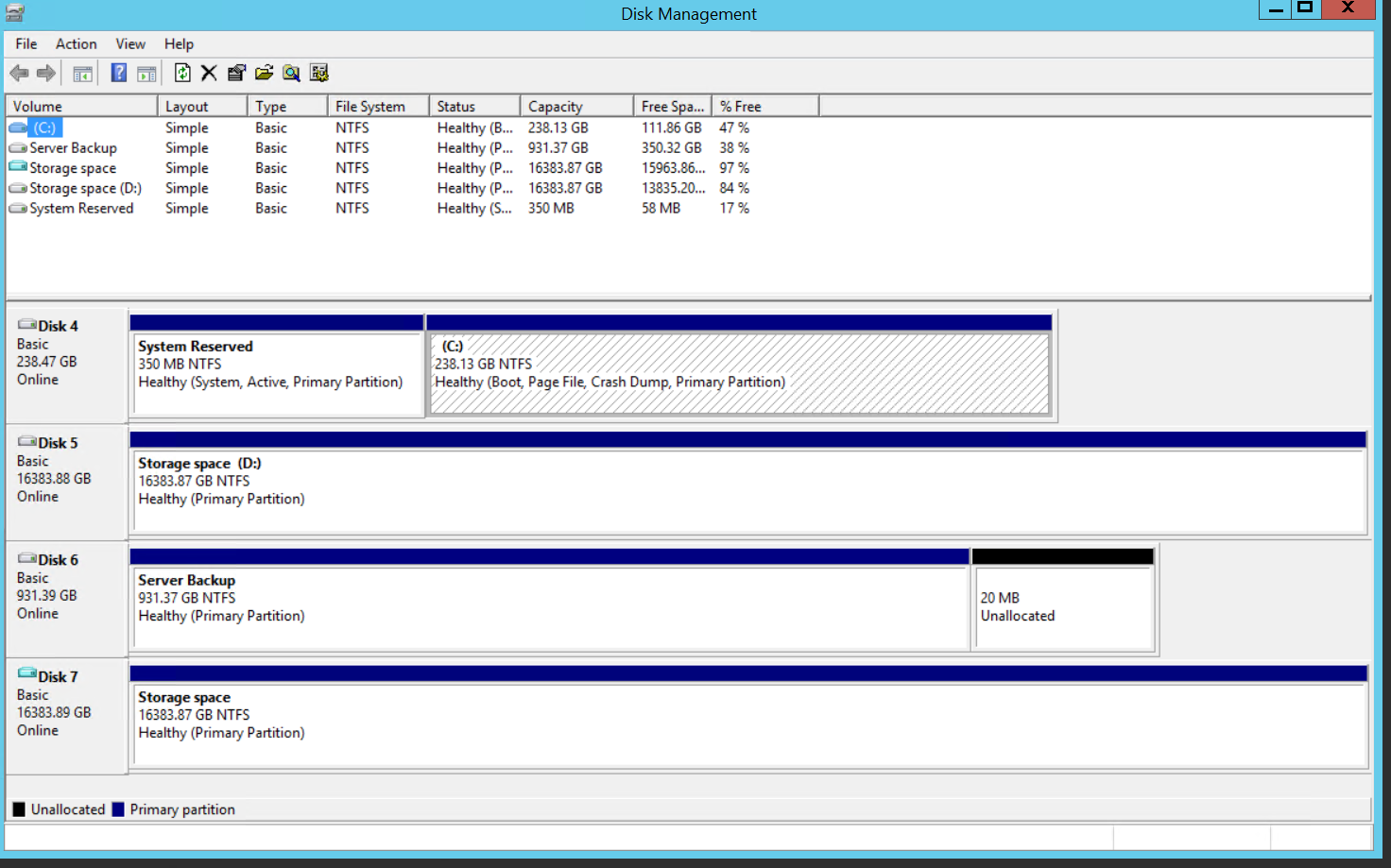
Hi Jason, So based on the newly attached photo and knowing it's only 1 x pool, 4 x physical drives and what I assume would also be classed as 1 x Virtual Disk, would you say I'm safe to run the powershell resize command? And if so can you type out the exact command so I can just copy and paste into Powershell, thanks a bunch for this you'll be a life saver if I can do this without having to format and start again.
-
Storage Space issues with Server 2012 R2
Th3Architect replied to Th3Architect's topic in Storage Devices
Hi Jason, Thanks again for the help, so based on the information you've given me here - Im assuming with thin provisioning if I have a 100GB VD and I put 20GBs of Data in it, that would make it 20GB, if I then put another 40GB in it will make it 60GB, if I were to then delete the 40GB it will stay at 60GB not shrink back down to 20GB as you would expect to see on a normal HDD storage space. If that is correct does this mean I should be using Thick provisioning and will both myself and my clients see this as the actual storage size along with the fact that when I delete data it will actually free up that space? Thanks again and sorry for all the noob q's I'm trying to get my head around S2012 R2, thanks -
Sorry no, I only use acronis and it's worth it if you buy it
-
Acronis True Image is what you want, boot from the disc, choose the drive you want clone, choose the drive you want to clone to, let it do it's thing, power down, swap out 256GB with 500GB and boot into Windows everything will be as it was, format other SSD and away you go - Hope this helps.
-
Storage Space issues with Server 2012 R2
Th3Architect replied to Th3Architect's topic in Storage Devices
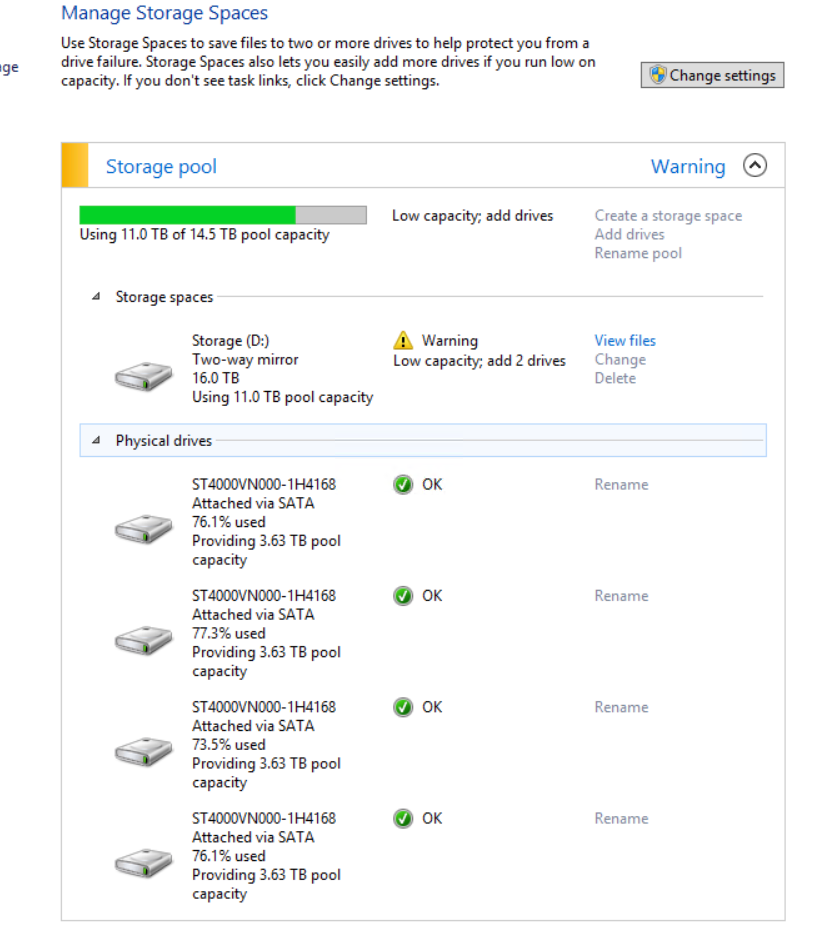
Hi Jason, Thanks for the reply, you were indeed right the provisioning type is showing as Thin. first question is 'Should this have been a different type of provisioning?' and secondly I went on the basis that my pool should be 16TB as 4x4TB = 16TB am I right in thinking I should have made my pool 8TB as I knew I was going to be mirroring them? What I was trying to do was not fool myself by making it larger than it actually was, to put it simply I just wanted it showing exactly what storage I had available to me rather than a pool twice the size of my actual storage, have done the complete opposite here? And if you don't mind how would I go about creating a new thinly provisioned virtual disk, all my sata ports are full I think except maybe one, I will be backing up the data to larger external drives over the next day or two ready to carry out whatever it is I need to do just in case. I'm thinking of starting again with the storage pool if turns out to be awkward and if I do as per my info above how would you suggest setting it up. Thank you for your advice BTW it's very much appreciated. -
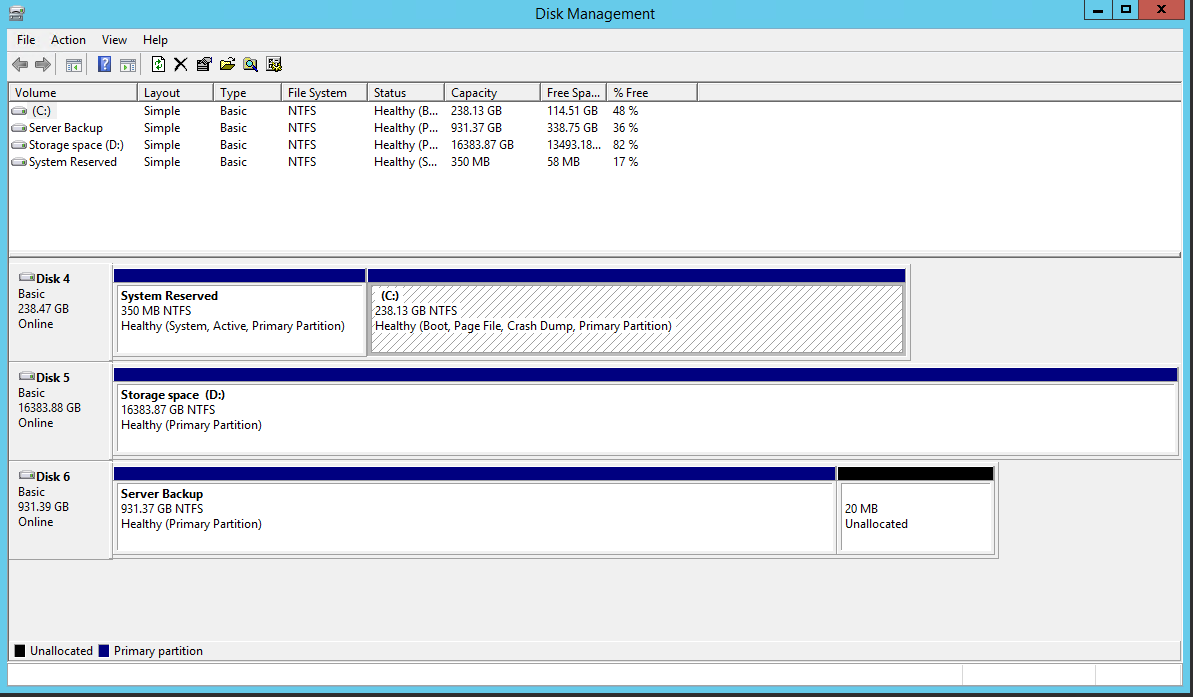
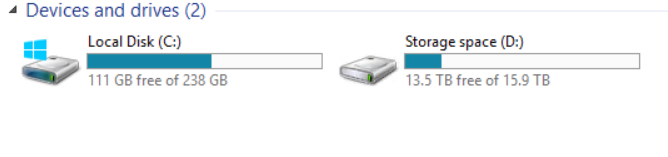
Hi All - So I'm having some issues with one of my Windows Server 2012 R2 machines - I decide to try out the Storage Spaces in the O/S and found it easy to setup and fairly easy to figure out the difference between pools and actual storage etc. It has been running on my server for nearly a year and is used to back up A LOT of data while I work on customers machines, ie reformats. My issue is that I have 4 x 4TB drives in a two-way mirror so 16TB total 8TB actual, my storage pool is saying I need to add more drives as my pool is too full, I have cleared out SOOOO much data but the pool doesn't think I have, is there anyway to 'jump start' storage spaces into realising I have released all that space? I have attached screenshots so you can see. Oh and I've just noticed the virtual drive showing up in Disk Management, I've seen this before but not on my machine and it was NOT there before the reboot I did about an hour ago so that doesn't have anything to do with my current issue but if anyone knows why it's doing it I'd love to know. Thank you for any wisdom you might be able to impart, I really don't want to have to take this server offline at all
-
Hi again guys, OK so I need a little help with my OpenVPN setup and didn't want to start a new thread sooo.... I have managed to get OpenVPN setup and can now access my server using remote desktop like gladiateduke suggested (Thanks for that mate) only problem is in order for this to work I have to put my OpenVPN setup into TAP interface type mode so I get issued an IP through DHCP and can access my server, unfortunately android does not support TAP OpenVPNs....so is there a way I can access my server with remote desktop in TUN mode and have my android devices work as well. I have tried connecting to my server in TUN mode using the IP address which doesn't work however if I search in file explorer using IP address I can see my shares. Thanks
-
They all look like premium peripherals...but weirdly I'm strangely diggin' the mouse pad the most, it looks badass. The headset is awesome too, the wood effect would match my Moto X Style
-
Yh I will do thanks, I'm gna leave the post open for another week or so while checking my network in case I see anything flag up otherwise I'll mark as solved, thanks for all the help!
-
You sir are a genius, I shall look into learning openVPN and finding out how to set it up in pfSense. I'm going to look into the country blocking issue because I think the pfBlocker package for pfSense gets around that issue...somehow...I know I've blocked nearly every country on my work network but can still get to most sites a lot of which are in the US. Thanks again for the info
-
Thanks for the info Gladiateduke, I would very much like some help with the auditing as I've no idea how to go about setting that up and I'm definitely interested in knowing how to make it more secure. I'm guessing a problem with blocking an external IP following your instructions though that if the attacker is using a VPN would that not make it pointless to some degree? After playing around with the pfsense I built at work I've managed to install a package that allows me to block IP's from whole countries at a time, I'm assuming if I were to do this at home then use the pfsense for openVPN server as well it could be much more secure? I know using openVPN I could access network folders etc easily but how would I go about accessing the desktop of my server this way, this is one of the main reasons I like to use anywhere access as I can just hop onto my server anytime anywhere. Thanks for all the insight guys.
-
Funny you should say that I have a Vigor 130 sat here at work, might put it to use with a pfsense box. Any ideas where to buy a decent pre-built pfsense, I've built them myself in the past but never been able to get them really small always mini itx style ones, preferably one with built in wifi too. I've also changed the Wifi password multiple times and still happens, I was wondering whether they had something listening in on my end I've had a play about with Wireshark but don't really understand it, will take another bash at it next time I notice anything strange though. Thanks again
-
Hi leadeater thanks for joining in, I'm pretty sure they are gaining access I first noticed when I was using the original BT HH4 as my router, opening ports was easy and everything just worked, but then I noticed in my DHCP list that there was someone connected using a completely different subnet to the one setup in my router (standard 192.168.1.XXX) it gave the name of his PC (MichaelsMBP) and an IP address something like 10.13.134.10 completely different to the range of addresses my router should be handing out. If your familiar with the BT router you can quickly see who's connected looking at the Home Network tab, this connection didn't show up there it was only on the DHCP list, everytime I deleted the user they were back on in minutes. This is why I bought the Asus router, using the MAC address filter I blocked his MAC address, no more problems. however now if you look into the connected clients on the Asus (and I have port 443 open) it tells me that my 'servername' has another client connected to it and is assigned another IP address other than the static one I have assigned to my server, I know I'm struggling a little to explain, I will open the ports again and keep watch if it happens again I'll screen shot for you, it's really bothering me that someone could be on my network and the thought of re-installing my server turns my stomach. Thanks again for any help.
-
Thanks for this Kyle, as far as I'm aware Plex is setup to only allow authenticated users outside the LAN anyway, I know I have to log in to access it outside of my network. Do you have any links as to how to setup an ubuntu VM for OpenVPN or would using the OpenVPN system built into the Asus router suffice? Thanks for the info, much appreciated.