Liquidshadow
-
Posts
14 -
Joined
-
Last visited
Liquidshadow's Achievements

-
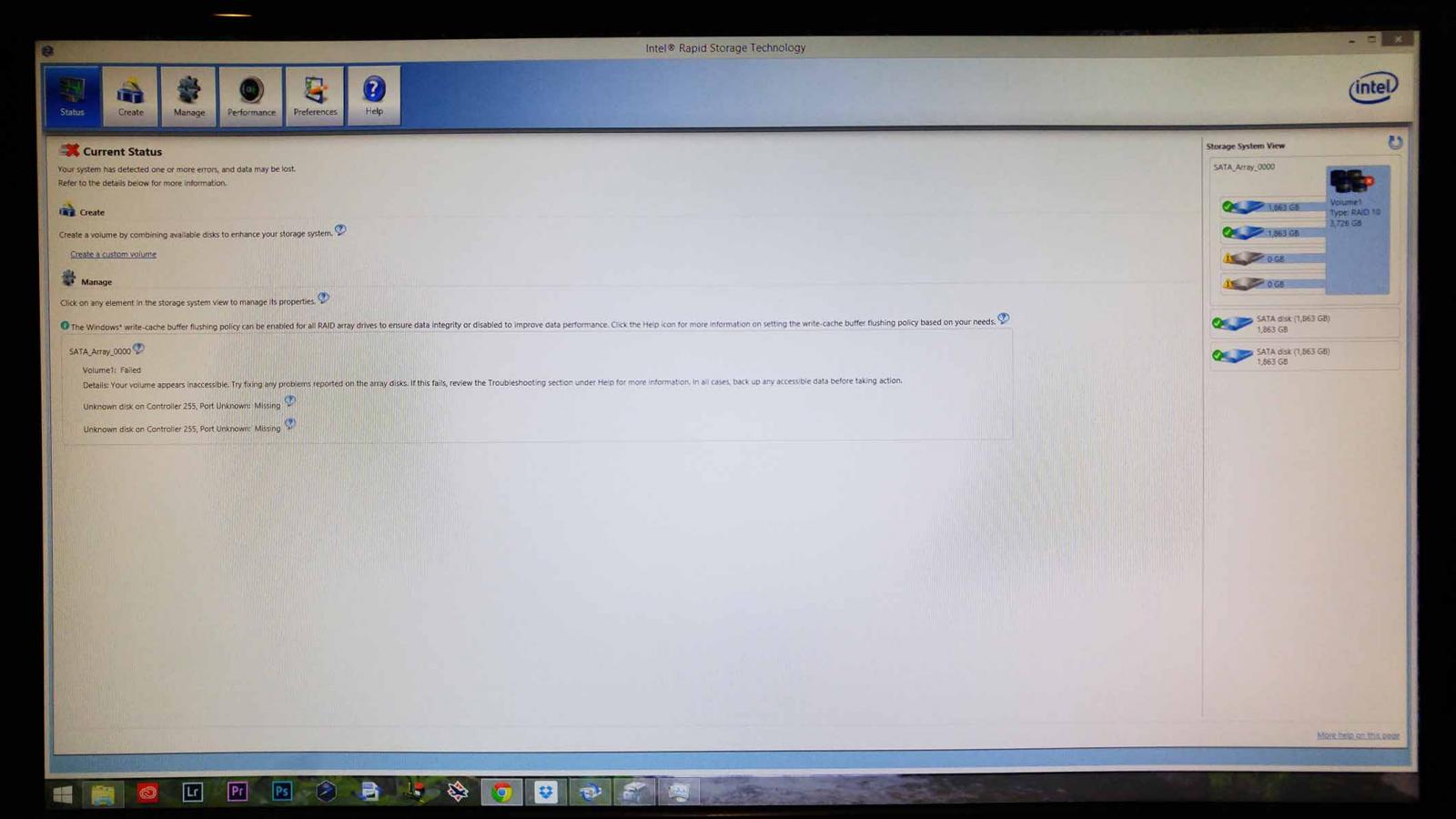
A few days ago my RAID10 failed (2TB x 4) with "Unknown disk on Controller 255, Port Unknown: Missing". The hard drives show up in the bios and even in 'My Computer' but they are inaccessible. If you take a look at the picture it shows that 2 drives have a normal status and the other two are "missing". I have a ton of important data on these disks that I didn't want to loose(hence the raid10...). Is there a way to relink these without data loss/ what steps should I take? I'm using the Asus X99 Deluxe and Intel Rapid Storage Technology program for my RAID config. The weird thing is that it fell apart after I installed the latest nvidia graphics driver. Basically what happened was I downloaded the driver, installed it, but never restarted my computer to finish the installation until a few days later. At some point between when I installed it and when my raid failed I forgot that I had emptied my downloads folder which was where the graphics driver was. I had a little pop up that stated that I need to restart the computer to finish the install, so I did, and that was when it all kinda freaked out. I had to re-download the graphics driver and finish the install then and there but the raid is still broken. Meanwhile, I have purchased a 5TB HDD in case I need to copy everything over somehow but I'm not sure how or if I can even do that.

-
 Oh, my applogies! The SSD's are actually 850 Evo's. Could it be a similar problem?
 -
So I have two samsung 840 Evo's in my computer I built 6 months ago; a 250GB with the OS on it and a 500GB for games, Adobe software, etc. I also have 4x 2TB HDD's in a RAID10 array. My question is, Samsung magician software does not support RAID configurations of any kind, but can my computer work properly with the Magician software installed since it's not the SSD's that are in RAID config? I do a lot of 4K video editing and it just seems like my SSD's aren't behaving like they should, so I'm wondering if I should have installed the Magician software 6 months ago... Any info would be helpful, thanks
-
If you're reading this, that probably means I won...right? Vessel Username: Liquidshadow Video watched and commented on #1: "LG 34UM67 Curved Ultrawide Monitor FreeSync Monitor" https://www.vessel.com/videos/G-DUjgUyY Video watched and commented on #2: "Thrustmaster Warthog A10C- The best H.O.T.A.S. out there?" https://www.vessel.com/videos/Yj4PbcgKj
-
It's finally up and running. Custom built myself, ladies and gentlemen, The Beast!!! Specs: i7 5960X- 8 Core CPU Cooler Master Nepton 240M CPU water cooler Asus X99 Deluxe Motherboard Crucial DDR4 RAM- 16GB 2666 Asus GTX 970, 4GB GPU Cooler Master Cosmos SE case Corsair 1050 Watt PSU 250GB Samsung 850 Evo SSD 500GB Samsung 850 Evo SSD 4x 2TB Western Digital Black HDD's in RAID 10 configuration LG Blu-ray player/ burner
-
-
The new (and improved?) Linus Tech Tips intro
Liquidshadow replied to LinusTech's topic in LTT Releases
I think you need to fade up the music at the beginning before the dancing square. This lets users know their sound is turned on and will also give them a sense of their volume before the blaringly loud music kicks in(which can be slightly annoying in the middle of the night when others are trying to sleep.) I was also going to suggest a vignette around the closing logo to draw in attention to it. Other than that, looks great! -
Need help! RAID 10- Simple, Spanned, Striped or Mirrored?
Liquidshadow replied to Liquidshadow's topic in Troubleshooting
Ok, great, I got it all working but now I'm trying to partition the RAID in half. It doesn't mind the first partition but the second one won't show up under My Computer. -
I just created a RAID 10 setup. I'm "Managing" my drives in the Computer Management section of windows 8.1 but I'm not sure which one to choose for this particular setup- Simple, Spanned, Striped or Mirrored? I'm assuming striped but I just want to be sure. I would also like to partition the 4TB(4x 2TB total in RAID 10) in half to two halves for two 2TB drives. Is that possible at this point?
-
I'm trying to finish my new Asus X99 Delux setup but keep getting this message while installing windows 8.1: "Windows cannot be installed to this disk. This computer's hardware may not support booting to this disk. Ensure the disk's controller is enabled in the computer's BIOS menu." I'm trying to install windows 8.1 on 2x 250GB Samsung 850 Evo's in RAID 0. These drives never show up together in RAID 0 as bootable in the bios-- they only show up as one drive or the other. I have plugged both drives in one at a time to ensure they are working and they both show up but never at the same time in the boot section. (Note: They do both show up in the list of connected SATA devices at the same time). Both controller 1 and 2 are enabled and set to RAID I followed the instructions here: http://goo.gl/lQr0Sn from Erick Pena and it made the RAID configuration show up in the 8.1 installer section but it gave me this: "We couldn't install Windows in the location you chose. Please check your media drive. Here's more info about what happened: 0x80070017" Looking up that code it sounds like maybe the USB stick I'm trying to boot off of is corrupt, however, I was able to install Windows via the USB but only on a single SSD. Any ideas? I'm really trying to get this thing up and running for work. Thank you Pictures:
-
Thanks guys, I think I'll hold off putting my 2x2TB drives into RAID, buy a few more and put it in RAID 10
-
So I'm finishing my computer build tonight. I'm putting 2x SSD's in RAID 0. I also have 2x 2TB HDD that I want to eventually put in RAID 10(using 4 hard drives). My question is can I put the 2x 2TB hard drives in RAID 0 right now and eventually put them easily in RAID 10 once I pick up two more drives? Or would I have to format each drive first? Thanks
-
I just purchased my last component for my new X99 build last night(the 5960x!) If I win this I'll just have to give it to my room mate so he can start his new build!
-
There is rumor that the 900 series graphics cards are going to get a VRAM upgrade to 8GB's but where are they and when might we expect them?