Znow
-
Posts
19 -
Joined
-
Last visited
Znow's Achievements

-
So what are the advantages and disadvantages of managed and unmanaged switches? Thanks, -George
-
Ok so I feel this thread is drawing to an end, Here is my final product list, could someone please check through encase there is something missing or if something is just wrong? -9u 19 Inch Cabinet -3 AP's and one outdoor AP -16 Port Gigabit Unmanaged Network Switch with 80w 8 Port PoE -PDU rack mountable surge protector thing 1U -M6 Cage nuts and bolts etc what do I need in terms of cables? I have been looking at 10m cat5e cables with female to female extender things as I have no clue how long they will need to be channeled, will multiple of these on a single line be problematic or can you use as many as you want? One more question regarding the ISP provided router modem thing, I want to put this into the cabinet so could I just use a longer ADSL cable to put the filter in the cabinet too because I don't want an ugly white box dangling from one of the walls so yeah with those questions answered I believe that is it, I do guarantee I will run into trouble when I try to set it all up so Im sure this thread wil be revived at a later date, maybe even with pictures etc to make this a cool project log kind of thing, Thanks, -George
-
Hi, I am not too sure if that will be needed, Is there a problem with simply running a really long cat 5 cable from the switch to each of the AP's? because that was what I was planning on doing and as long as the cable gets from A to B without being seen it should work right? I'm not experienced in this area so please correct me if i am wrong, Thanks, -George
-
Hi, the house does not have structured network cabling unfortunately but I plan to hire an electrician to run the ethernet cables through the ceiling to each of the AP's, and back into the third floor where my workstation and router etc will all be based. About the network speeds I use BT at the moment and I can get over 90 Mbps down with an advertised speed of 100 which I guess is very lucky but the current homeowner where I am going to be moving in does not even have a broadband subscription so I have no clue how it will be, if virgin ends up being a bit pants then I can always go back to BT as I am not moving that far so hopefully the speeds will be similar. The Netduma router is a rather unknown one I must say but its features greatly appeal to me but could someone please check out the website and see if it is suitable for what I am planning as I don't want it to create a bottleneck and I'm sure I can cope with another router and lose some specific functionality. Regarding the wireless solution, Linus has made a video on it so that is one of the reasons I chose it, Also regarding the rack I found this, http://www.amazon.co.uk/gp/product/B00URMCQGW?psc=1&redirect=true&ref_=ox_sc_act_title_5&smid=A2R91RULSUJVUK It is 9U which is rather small I believe, What else would I need to get this up and running? I see some people have surge protectors inside the rack, there are fans in the rack but i am not sure about their power connectors, could someone please help me with this? thanks, -George
-
I think it might also be a good idea as in the future I might want to add a CCTV camera or two, At this point is it worth getting a tiny rack otherwise all of this will be shoved on the floor under a desk. Are there any good ideas regarding storage as I believe having a rack for one switch is a bit overkill unless there is a way to store the modem and router in there also, Thanks, -George
-
I have just spotted something that could be rather useful, It is a desktop switch but it has PoE so I would not have to run separate injectors for each AP, Is this something that could be recommended? the exact one I am looking at is here, http://www.amazon.co.uk/Linksys-Business-Desktop-Gigabit-Unmanaged-x/dp/B00GQATMFM/ref=sr_1_1?ie=UTF8&qid=1437257110&sr=8-1&keywords=PoE+switch+6+port George
-
Ok so here are the products I have decided on getting, UniFi 3 Pack, http://www.amazon.co.uk/gp/product/B008M8GZQU?psc=1&redirect=true&ref_=ox_sc_act_title_1&smid=A1CSD37BFGDG5P UniFi Outdoor+ http://www.amazon.co.uk/gp/product/B00I4QI58Q?psc=1&redirect=true&ref_=ox_sc_act_title_2&smid=A1E9J69HEAFOUP Netduma Gaming Router http://netduma.com/ TP-Link 8 Port Switch http://www.amazon.co.uk/gp/product/B00A121WN6?psc=1&redirect=true&ref_=ox_sc_act_title_3&smid=A3P5ROKL5A1OLE So I will have to route another PoE cable to an outdoor wall but that should not be too difficult. Are there any recommendations or upgrades anyone would suggest? I really want to nail this and not have to worry about it for a while, Thanks, George
-
Thank you very much, that was really helpful, So when it is all installed will there be any setup or will the AP's just take the PoE connection and work? Also with the different AP's are they individual networks or will devices jump from one to another as one is out of range etc... I plan on getting a switch as I may want some powerline connections in the future for many things... Now this may sound really stupid but I do plug the access points into the switch and link the switch with the Netduma router and it should in theory just work? Thanks, George
-
Hello, I am soon to be moving house, the 27th of this month exactly. I live in the UK and the broadband provider I am going to be using is Virgin Media who offer a fibre-optic service and advertise 160 down and 90 upload speeds, The house I am going to be moving into will need a bit more of an advanced networking solution than just the ISP's router. I am very inexperienced when it comes to networking, I would like some help on what I should buy and how on earth I should set it up, Firstly I am planning on having a Netduma router for my workstation and a UniFi access point on each of the 3 floors. Firstly what else would I need to make this work? Honestly I do not even know what a Network switch does so that could give an idea of what kind of situation I am in. I have read a bit up on PoE and plan to use it with the UniFi system (if there is a choice) so could I please have some suggestions as to what I should do with this project and any other things I would need. Fortunately I am not too worried about budget but I really do not intend to drop a bomb on this so reasonable but relatively a 'pro-sumer' solution would be perfect, I'm not sure whether or not this is too vague of a question but I look forward to your replies, Thanks, -George The Netduma router can be found here: http://netduma.com/ And the UniFi system https://www.ubnt.com/unifi/unifi-ap/
-
I will have to test this out, I have some spare tube but making a mould could be hard, I do plan to do this with soft tube
-
To be honest I'm not really looking for a Xeon, The color scheme will not fit it unless I do some serious modifications etc and I have already planned a lot with the components I have chosen
-
Hello, I have a rather unusual idea that I believe I could use some help in. Basically, I am building a PC themed around a Kraken (Build Log http://linustechtips.com/main/topic/400043-project-kraken/ ) So this idea is quite out there, I want the tubing in my loop to be tentacles. I have been thinking of different ways i could achieve this such as getting normal tubing and pretty much modifying it with some setting plastic, effectively like modelling. I decided I could use silicon but again this is rather difficult. What I am asking is if anyone has any suggestions as to how I could achieve this look I want, Thanks, -George EDIT: I believe I posted this in the wrong section, Could a mod please move the thread to the correct section please? Thankyou very much
-
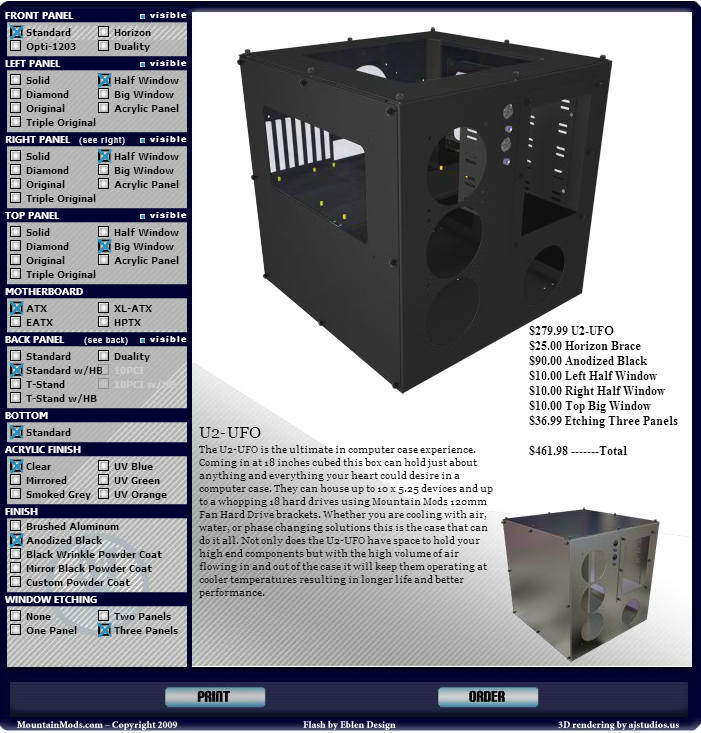
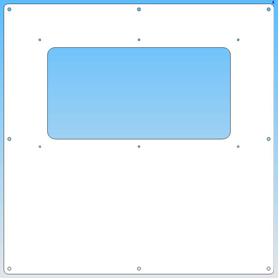
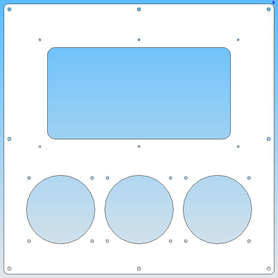
So here is what is happening with the case. I am going to be ordering this case once I have got the laser etching designs for the panels sorted out. Here you can see the specific configurations of the case I have selected encase anyone wants to use them. Here are the panels individually so you can get an idea of what the case actually looks like and where the laser etching will actually go. This is the front panel, It has 3 x 120mm fans where I am going to put a 360 radiator and I have an interesting idea for fan grills that I'm sure people will be interested in. This is the left panel, This is where one of the graphics shown above will be implemented (once altered) The right panel is almost identical but with another 3 x 120mm fans where I am going to put another 360 radiator and Interesting design with fan grills And finally we have the top panel. It is going to have a large window to see the components in the computer as the motherboard is horizontally mounted etc Thankyou very much for reading and I hope this project will reach fruition fairly soon! It depends on which Xeon really, I am looking for a powerful workstation PC but I think that x99 is more consumer friendly than Xeon so I have went with purely for ease of use and also ECC ram doesnt look pretty and neither do half of the workstation Xeon motherboards

-
So this is one of the designs I have been sent for the side panels, I am not too sure about it. The side panels are clear and are going to be laser etched so I could put a lot more detail into these which I have requested from the graphics dude. The 5930k is a 6 core i7
-
Hello, My main objective of this project is to produce a system that will ridiculously outperform what it needs to do. Why you ask? I'm not too sure myself either; anyway lets get on with this. Firstly I want to convey what I want Project Kraken to be, I am aiming to make a themed build surrounding the idea of a Kraken in black and white colors. Surprisingly the idea for this theme came from the advert of a bottle of Rum called "The Kraken Rum" which if you manage to find on YouTube or their website you will find is actually quite an interesting concept. My plans at the moment are to have... Mountain Mods U2 UFO CYO (cube case) Asus X99 Deluxe Motherboard Intel 5930k 32GB of GeIL Super Luce White LED DDR4 Nvidia GTX 980 This is just the first post, No photos as of yet. The next posts will be planning the watercooling loop and the custom case modifications.