sendekyo
-
Posts
36 -
Joined
-
Last visited
1 Follower

sendekyo's Achievements

-
 Intel Pentium G3258 4.4GHz 1.31V EVGA GTX 970 Cinebench R15 OpenGL: 118.44 Ref. Match: 99.6 CPU: 318 CPU Single Core: 166 MP Ratio: 1.92
- 18,262 replies
-
- 1
-

-
- cinebench r15
- cinebench
- (and 3 more)
-
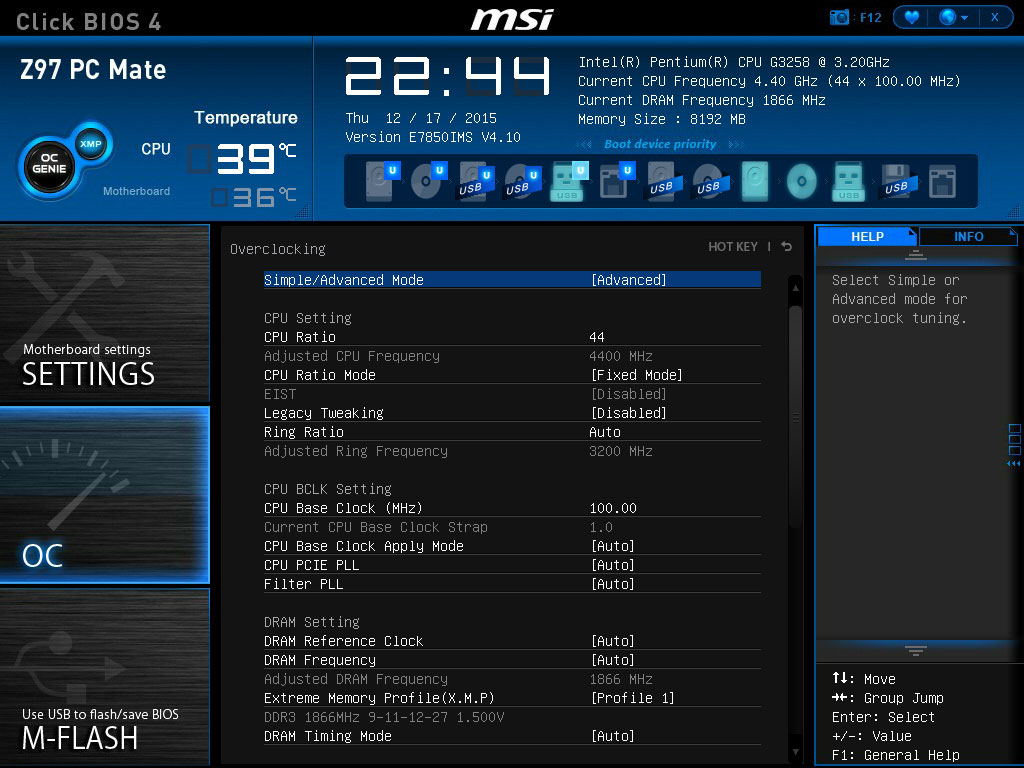
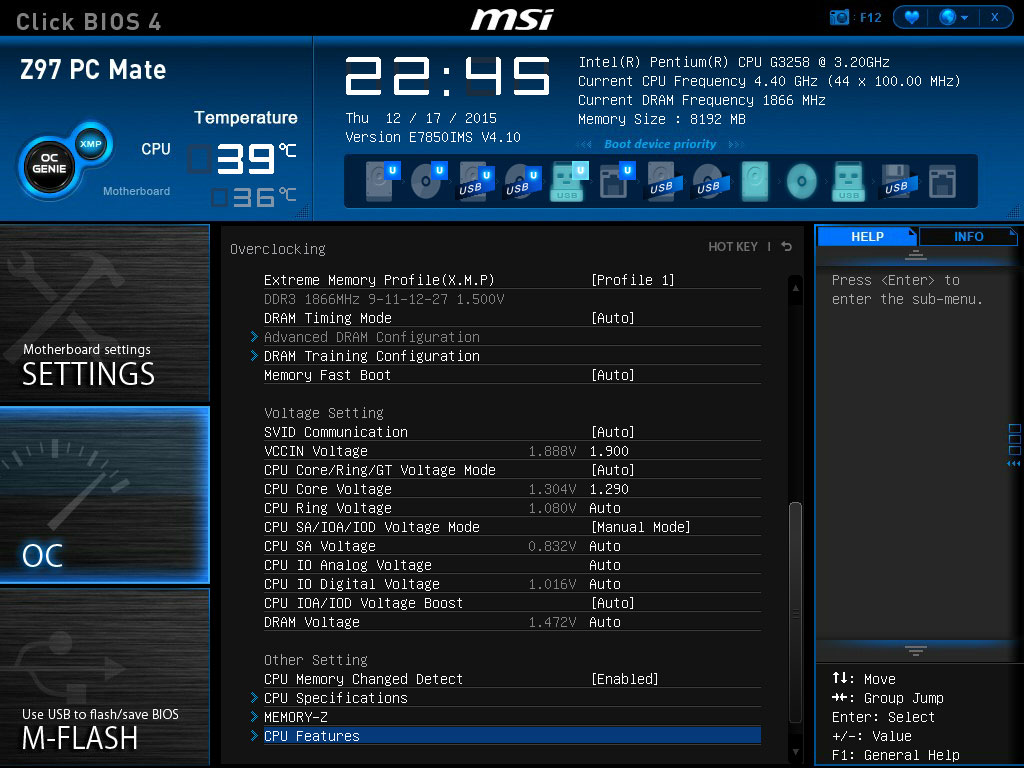
I continue to see this error message in Event Viewer. It's usually random, but it typically happens several times in succession throughout the day. The latest string of errors occurred while I was watching a few YouTube videos. I count 47 errors total over the course of approximately one hour. Both CPU cores appear in these messages, although sometimes it flip flops between 0 or 2. Log Name: SystemSource: Microsoft-Windows-WHEA-LoggerDate: 12/21/2015 4:34:04 PMEvent ID: 19Task Category: NoneLevel: WarningKeywords:User: LOCAL SERVICEComputer:Description:A corrected hardware error has occurred.Reported by component: Processor CoreError Source: Corrected Machine CheckError Type: Internal parity errorProcessor ID: 0My searches tell me this is usually overclock related, but I'm not sure what to do about it as I get them at default/auto settings as well.I built my system back in March with an Intel Penium G3258, MSI Z97 PC Mate, and 8GB of Kingston RAM. I've used the system at default settings as well as overclocked at different amounts; whether it was just the CPU, just the RAM, or both. I installed a new CPU cooler recently and I'm in the process of identifying a better overclock; however, these error messages continue to plague me.
-
Intel Haswell 4670k + 4770K Overclocking guide
sendekyo replied to ProKoN's topic in Guides and Tutorials
Thank you for your time, BigDay. I have a lot of work ahead of me, but I'll follow up when I reach my final numbers. One more quick question. I know ProKoN emphasized the importance of using Intel XTU as compared to AIDA64, and I don't mind using a different utility; however, what happens at the end of the 30 day trial? Will I retain access to the stability test tool, will I have to download/install AIDA64 again, or will that be the end of it? Apologies that I could not find this information on my own. -
Intel Haswell 4670k + 4770K Overclocking guide
sendekyo replied to ProKoN's topic in Guides and Tutorials
I was using my daily machine settings at the time of my last BSOD. The attachments should cover everything. Admittedly, I do have XMP enabled, which seemed to work fine with default clock speeds as well as my previous 3.8GHz overclock. Both functioned without issue for several months, but I'll gladly shut it off if you feel it's a factor.
-
Intel Haswell 4670k + 4770K Overclocking guide
sendekyo replied to ProKoN's topic in Guides and Tutorials
Should I stick with 1.90V VCCIN? I hit a BSOD last night under my previously stable settings. This occurred after several days of gaming and normal operation, beyond the 8-12 hours of stressing. My initial response was to increase my VCCIN to 2.0V, which was what ProKoN said initially in his first video, but I feel like I will need to add another 0.01V to my VCore if it continues. Should I dial back my VCCIN and just up my VCore? Yep, I figured the same thing and that seems like a smart approach. Thanks very much, BigDay. I love this Phanteks cooler. -
Intel Haswell 4670k + 4770K Overclocking guide
sendekyo replied to ProKoN's topic in Guides and Tutorials
That's what I've read as well, but I had decided to follow ProKoN's guide regardless. In fact, I read Overclock.net claimed Ring Bus doesn't matter much at all. Thanks for the advice, although I'd prefer to stay below 1.3V. I'll probably dial down the Ring Bus to 4200 or 4000MHz if I can't reach stability before 2.0V VCCIN. -
Intel Haswell 4670k + 4770K Overclocking guide
sendekyo replied to ProKoN's topic in Guides and Tutorials
I want to thank ProKoN for all of your information. I have been working on overclocking my Intel Pentium G3258 which is cooled by a Phanteks PH-TC14PE. My CPU doesn't seem to be a silicon lottery winner, but I believe I found stability at 4.4GHz @ 1.29V (65°C), 4.5GHz @ 1.38V (68°C), and 4.6GHz @ 1.48V (77°C). I prefer quiet operation, so I'm moving forward with my 4.4GHz OC. Here are the settings I'm currently using as my daily machine: 4.4GHz @ 1.29V (65°C) 3200MHz Ring Bus @ Auto VCCIN 1.9V I've not considered overclocking the Ring Bus until I found ProKoN's video series, but I have tinkered with it with no success for now. It appears to be incredibly unstable at 1:1 with my testing so far. My last test was 4400MHz @ 1.29V with a 1.93V VCCIN, but my system froze during stress after 5-10 seconds. I plan to continue increasing the VCCIN until I reach 2.0V. If I'm still unstable, then I intend to decrease the Ring Bus Ratio and perhaps the Ring Bus voltage and/or VCCIN. If I can't reach 1:1, then I hope I can settle on at least 4000MHz Ring Bus. All that said, I wonder if I can get a little feedback. I feel like I'm following the guide pretty closely, which is quite easy because I have an MSI motherboard, but how is my progress? -
Digging this up again for some more user input. Which would you prefer? Final costs are noted after any rebates. Option 1 OCZ ARC 100 120GB ($59.99 @ Amazon) EVGA SuperNOVA B2 750W ($74.99 @ Amazon) NZXT S340 White ($56.99 @ Micro Center) $ 191.97 Option 2 Crucial MX100 128GB ($62.99 @ Amazon) EVGA SuperNOVA B2 750W ($74.99 @ Amazon) NZXT S340 White ($56.99 @ Micro Center) $ 194.97 Option 3 Samsung 850 EVO 120GB ($84.99 @ Amazon) EVGA SuperNOVA B2 750W ($74.99 @ Amazon) NZXT S340 White ($56.99 @ Micro Center) $ 216.97 Option 4 OCZ ARC 100 120GB ($59.99 @ Amazon) Antec TruePower Classic 750W ($49.99 @ Newegg) Fractal Design Define R5 Black ($109.99 @ Amazon) $ 219.97 Some of you may be wondering why the parts are combined as they are, but I assure you it's to save me money out of pocket. I have $140 to spend at Amazon thanks to a gift card. The main problem with any of these options is lack of availability of computer cases. Just about everything I'm tracking is out of stock with no ETA almost everywhere. #sadface
-
I grabbed the prices of several SSDs from PCPartPicker and their effective speeds according to UserBenchmark. I calculated the value sort of similarly to try to determine which would be the best choice. What do you think? =(Capacity*Speed)/SQRT(Price)*10
-
Yep. PCPartPicker just selected it since it's the cheapest option, but I know better. My list actually starts at the OCZ Arc 100 ($59.99) and up.
-
If you only had ~$200 to buy a case, SSD, and PSU what would you get? Cases: NZXT S340, NZXT H440, Fractal R5, Other? 120GB SSD: Crucial MX100, OCZ Arc100, SanDisk UltraII, Plextor M6S, Samsung 850 EVO, Other? 750W PSU: EVGA 750-B1, Antec TP-750C, Corsair CX750, EVGA 750-B2, Other? I'm trying to save money without cutting corners and hurting myself too badly. Here's a rough estimate of what I'm working with via PCPartPicker. Please keep in mind I'm getting the larger PSU with the anticipation of upgrading my GPU later this year. PCPartPicker part list / Price breakdown by merchant CPU: Intel Pentium G3258 3.2GHz Dual-Core Processor (Purchased For $59.99) Motherboard: MSI Z97 PC MATE ATX LGA1150 Motherboard (Purchased For $39.62) Memory: Kingston Savage 8GB (2 x 4GB) DDR3-1866 Memory (Purchased For $63.99) Storage: *Kingston SSDNow V300 Series 120GB 2.5" Solid State Drive ($52.99 @ Amazon) Video Card: HIS Radeon HD 6570 2GB Video Card (Purchased For $0.00) Case: *NZXT S340 (White) ATX Mid Tower Case ($72.90 @ Amazon) Power Supply: *EVGA SuperNOVA NEX 750W 80+ Bronze Certified Semi-Modular ATX Power Supply ($34.99 @ Newegg) Monitor: Asus VN248H-P 23.8" Monitor (Purchased For $0.00) Monitor: Asus VN248H-P 23.8" Monitor (Purchased For $0.00) Mouse: Cooler Master CM Storm Spawn Wired Optical Mouse (Purchased For $0.00) Other: Western Digital RE2 WD4000YR 400GB 7200 RPM 16MB Cache SATA 1.5Gb/s 3.5" (Purchased For $0.00) Other: ASUS SDRW-08D2S-U/W/G/ACI/AS Computer International Direct External Slim White 8X DVD-RW - Stylish Diamond Cut Design External Slim DVD-RW Optical Drive ($24.99) Total: $349.47 Prices include shipping, taxes, and discounts when available *Lowest price parts chosen from parametric criteria Generated by PCPartPicker 2015-02-04 18:17 EST-0500
-
My computer that was built in 2005 is definitely not impressive... but the peripherals are fine.
-
Thanks guys. I can't wait to overwhelm her with all the choices. lol
-
It looks like Logitech and Razer have software that should be compatible. Corsair doesn't appear to have Mac compatibility and isn't working on it, but I guess there are 3rd party options: SteerMouse, USB Overdrive, etc. I will share all these recommendations with her and will report back if she makes a decision. Thanks everyone for your responses!
-
My girlfriend uses a Logitech Marathon Mouse M705 and has gone through several of them over the past few years. She uses an iMac that runs Mac OS X 10.10 and Windows 7 Home 64-bit. The Mac side is used for graphic design and the Windows side is for gaming, typically MMOs. She's due for another replacement, not because the mouse doesn't function but because it's not as comfortable. The main reason why she likes to keep buying new mice is because she has long nails (TALONS) and the rubberized grip gets shredded over time. Recently she's been asking about gaming mice, but I figure she needs something a bit more rugged or solid. I'm not sure if it needs to be wireless, but I'm sure that's her preference. As for grip, she's either a palm or fingertip. It definitely should not have too many buttons, five would be ideal. I'm not sure she would consider anything with more than eight buttons. Obviously the mouse and any accompanying software must be Windows/Mac compatible. We live in the United States. Thanks for reading and for any assistance! [Edit] Tallied all your responses, just for the heck of it... Logitech G602 (6) - @ZetZet, @FoxHound, @GingerbreadPK, @, @SeanBond, @STRMfrmXMN Logitech G502 (3) - @gozzygozborn, @GingerbreadPK, @SeanBond Razer Deathadder (2) - @Fate, @Jonnyswboy Corsair Raptor M45 (2) - @Sonefiler, @SeanBond Corsair Raptor M30 (1) - @Sonefiler Asus ROG Gladius (1) - @SurvivorNVL Func MS-2 (1) - @SurvivorNVL Mionix Naos 7000 (1) - @SurvivorNVL Roccat Kone XTD (1) - @SurvivorNVL Zowie EVO EC2 (1) - @SurvivorNVL A couple others I tossed into the ring... Corsair Vengeance M65 Razer Mamba